| Home | Current Systems | Former STK Products | EOL Systems | Components | General Info | Search | Feedback |
|
|
Oracle System Handbook - ISO 7.0 May 2018 Internal/Partner Edition | ||
|
|||
 |
||||||||||||||||||||||||||||||||||||||||||
Sun Storage J4400 LEDsThe Sun Storage J4400 Array provides the following LED groupings:
Sun Storage J4400 Front Panel LEDs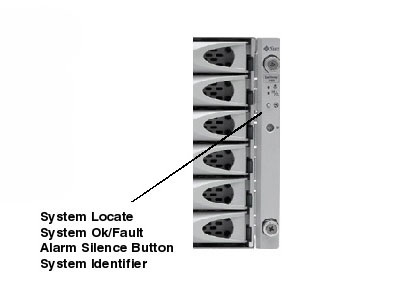
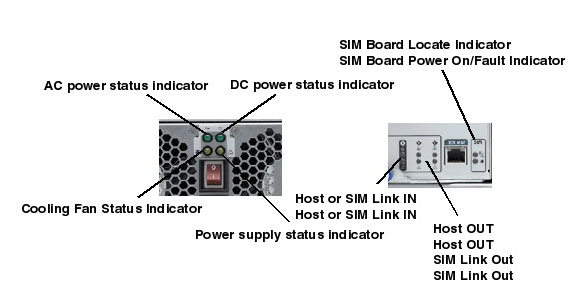
Sun Storage J4400 Rear Panel LEDs | ||||||||||||||||||||||||||||||||||||||||||
| LED Name | Description |
|---|---|
| J4400 AC power status Indicator | Green - On : AC power ready. |
| J4400 DC power status Indicator | Green - On : DC power ready |
| J4400 Cooling Fan Status Indicator | Amber - On : Fan failure |
| J4400 Power supply status Indicator | Amber - On : Power supply failure |
| J4400 SIM Board Locate Indicator | Locate Indicator - Blue: Identified as ready for service (not supported) |
| J4400 SIM Board Power On/Fault Indicator | Power On/Fault Indicator - Green/Amber |
| | | |
|
Copyright © 2018 Oracle and/or its affiliates. All rights reserved. Feedback | |||
| |||