| Home | Current Systems | Former STK Products | EOL Systems | Components | General Info | Search | Feedback |
|
|
Oracle System Handbook - ISO 7.0 May 2018 Internal/Partner Edition | ||
|
|||
 |
||||||||||||||||||||||||||||||||||||||||||||||||||||||
Oracle Storage DE3-24(C/P) LEDsThe Oracle Storage DE3-24(C/P) provides the following LED groupings:
Oracle Storage DE3-24(C/P) Front Panel LEDs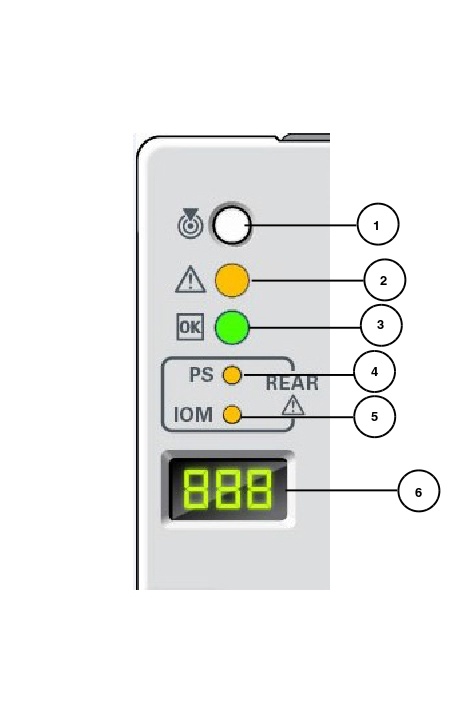
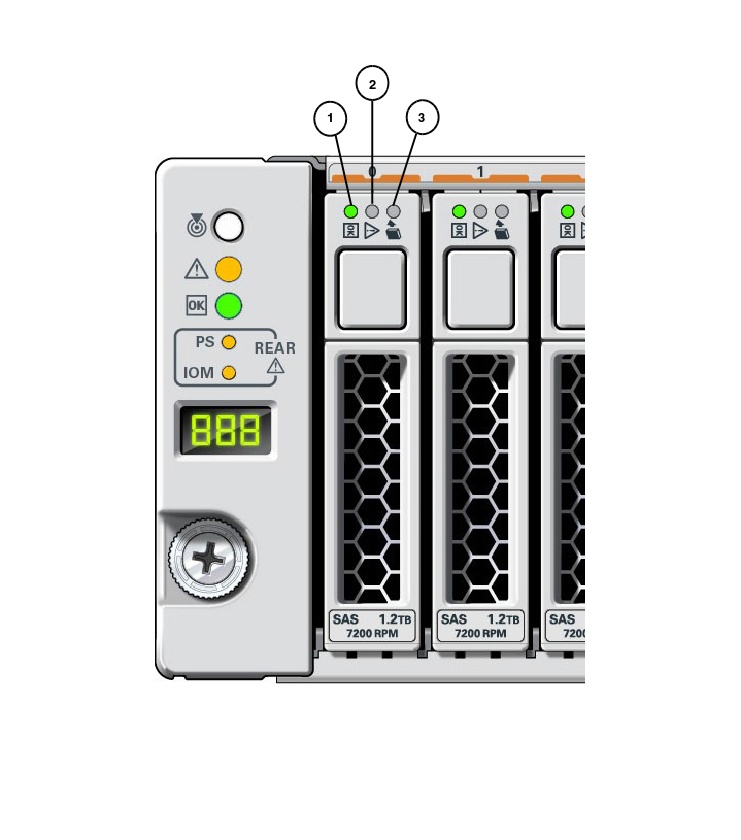
Oracle Storage DE3-24(C/P) Disk Drive LEDs | ||||||||||||||||||||||||||||||||||||||||||||||||||||||
| LED Name | Description |
|---|---|
| 1. OK/Activity HDDs (Green) | On: Read or write activity is in progress. Off: Drive is idle and available for use. |
| 2. Service Required (Amber) | Indicates that the drive has experienced a fault condition. |
| 3. Ready to Remove (Blue) | Indicates that a drive can be removed during a hot-service operation. |
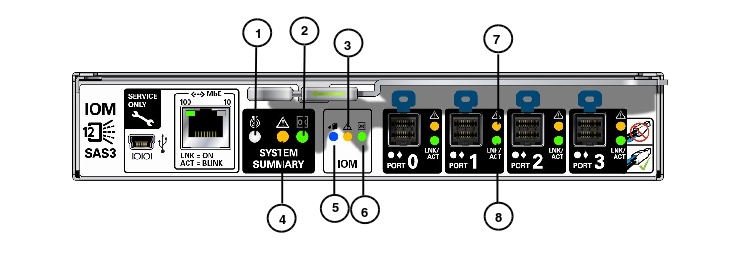
| LED Name | Description |
|---|---|
| 1. System Locate LED (White) - (On) | Allows for appliance locate. |
| 2. System OK LED (Green) - (On) | Normal appliance operation. |
| 3. IOM Fault LED (Amber) - (On) | Fault condition has been detected with the IOM. |
| 4. System Fault LED (Amber) - (On) | System fault has been detected within the appliance. |
| 5. IOM Service Action Allowed LED (Blue) - (On) | Indicates that an IOM can be removed during a hot-service operation.. |
| 6. IOM OK LED (Green) - (On) | IOM normal operation. |
| 7. Mini SAS Fault LED (Amber) - (On) | SAS Fault detected. |
| 8. Mini SAS Link/Activity LED (Green) - (On) | SAS Normal activity/operation. |
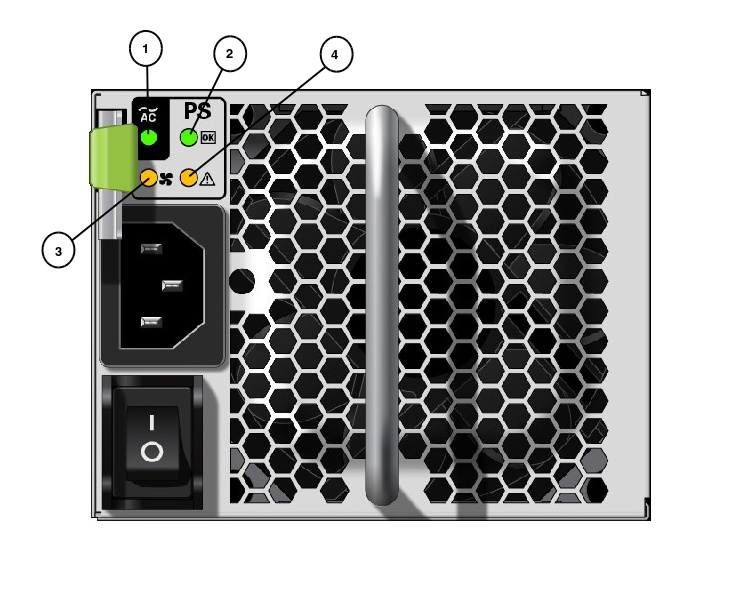
| LED Name | Description |
|---|---|
| 1. AC Input LED (Green) | Steady ON: AC voltage is applied to the power supply. |
| 2. OK (Green) LED | Steady ON: Normal operation. |
| 3. Fan LED (Amber) | Steady ON: Fan fault detected in the power supply. (NOTE: All fans in the enclosure are internal to the PSUs. |
| 4. Service Action Required & Locate LED (Amber) | Fast Blink: PSU locator function. The power supply is faulty. Service action is required. |
| | | |
|
Copyright © 2018 Oracle and/or its affiliates. All rights reserved. Feedback | |||
| |||