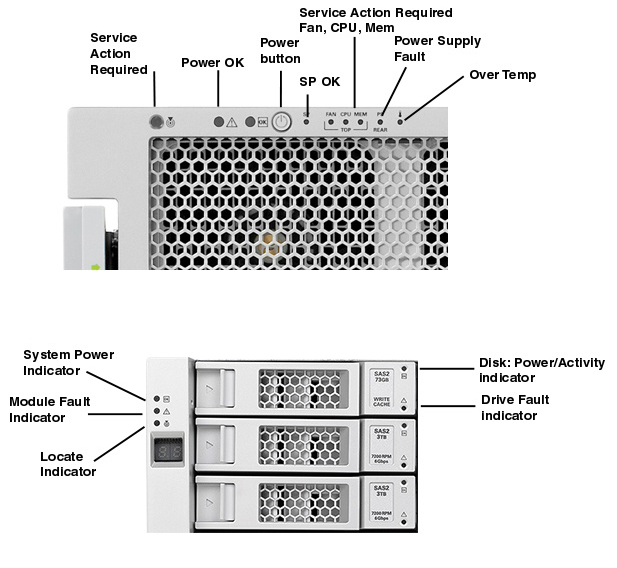
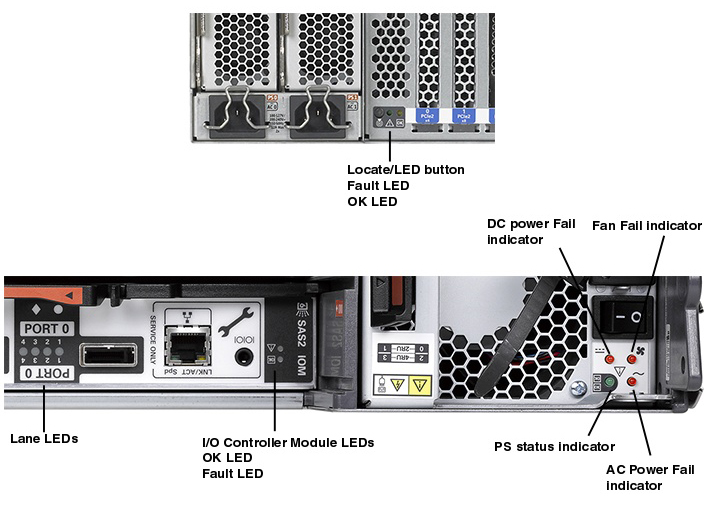
| LED Name |
LED color |
Description |
| Oracle ZFS Backup Appliance Service Action Required LED |
| Amber |
- A fault is detected by the system diagnostics, such as POST or ILOM.
- When a FRU fails, such as a power supply.
|
| Oracle ZFS Backup Appliance Power/OK LED |
Off |
The system is unavailable. System power might be off or simply disconnected. |
| Green - Steady On |
Normal Operating State |
| Green - Slow Blink |
Main power is off, the system is in standby mode. |
| Green - Fast Blink |
Indicates power is going off soon via a graceful shutdown or power has been applied to the system. |
| Oracle ZFS Backup Appliance Service Processor OK LED |
Off |
The system is unavailable. System power might be off or simply disconnected. |
| Green - Steady On |
Service Processor has successfully booted. |
| Green - Slow Blink |
Service Processor has booted and entered standby power mode. |
| Green - Fast Blink |
Service Processor is booting up. |
| Oracle ZFS Backup Appliance Power on/off Button |
Turns the system on and off. This button is recessed to prevent accidental server power-off.
There is no Power On/Off button on the rear panel.
|
| Oracle ZFS Backup Appliance Service Action Required - Fan LED |
Amber |
Fan module is faulty. See Fan Module LED inside system to identify faulty fan module.
|
| Oracle ZFS Backup Appliance Service Action Required - CPU LED |
Amber |
CPU is faulty. See CPU LED inside of system to identify faulty CPU (lit amber LED).
|
| Oracle ZFS Backup Appliance Service Action Required - Memory LED |
Amber |
Indicates a memory fault. See memory Riser LED inside system to identify specific
memory riser that contains faulty DIMM or DIMMs (lit amber LED).
|
| Oracle ZFS Backup Appliance Over Temperature LED |
Amber |
May light if a fan causes an increase in the system operating temperature.
|
| Oracle Storage DE2-24C Locate Indicator LED |
White - Off |
Not supported. |
| White - Blinking @ 1 Hz 50% |
Locate LED is active. |
| Oracle Storage DE2-24C Module Fault Indicator LED |
Green - Steady On |
System is powered on. |
| Amber - Off |
No current faults. |
| Amber - On |
System fault. |
| Oracle Storage DE2-24C System Power Indicator |
Green |
System powered on and functioning. |